Updated April 19, 2026 · By Alex Mercer
How to Pick the Best Budget Action Camera Under $100 (2026)


How to Pick the Best Budget Action Camera Under $100 (2026)
By Alex Mercer | Updated 2026
Affiliate disclosure: DashPicked earns from qualifying purchases. If you buy through my links, I may earn a small commission at no extra cost to you.
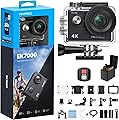
The AKASO EK7000 at $52.99 is my top pick for most people. It shoots 4K30FPS, has electronic image stabilization, goes 131 feet underwater, and has 38,000+ reviews proving it works in the real world. If you want everything included without shopping for extras, the AKASO Brave 4 bundle at $99.99 ships with a 64GB card and full accessories. Here's how to evaluate, buy, and set up any budget action camera the right way.
What You'll Need
- A budget action camera (my picks below, all under $100):
- AKASO EK7000 4K Action Camera, Black, $52.99 — best value overall
- AKASO EK7000, Blue version, $69.99 — same camera, different color
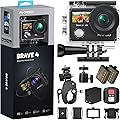
- AKASO Brave 4, $69.98 — slightly better color processing, good starter kit
- AKASO Brave 4 Bundle with 64GB Card, $99.99 — best complete kit under $100
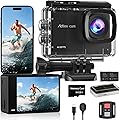
- 4K 60FPS Action Camera with 64GB Card, $47.99 — cheapest 4K60 option, unproven brand with only 656 reviews
- A microSD card rated U3 or V30 (Class 10 minimum), 32GB or 64GB
- A smartphone with the AKASO app installed (for WiFi control)
- Mounting hardware appropriate for your use case (helmet, handlebar, chest, etc.)
- A fully charged spare battery if your camera ships with one
Step-by-Step Guide
Step 1: Match the Camera to Your Actual Use Case
Before you buy anything, answer one question: where are you actually filming?
If the answer is "mostly outdoor sports, some underwater," the AKASO EK7000 is enough. It handles 4K30 video, stabilizes reasonably well with EIS, and survives 131 feet underwater without any extra case needed. At $52.99, it's the lowest-risk entry point with serious proof behind it.
If you want a more complete out-of-box experience without scrambling for accessories, the Brave 4 bundle at $99.99 ships with a 64GB microSD card, helmet mounts, a chest harness, and extra batteries. That bundle genuinely hits the ceiling of what $100 can buy right now.
If you're budget-tight and tempted by the 4K 60FPS option at $47.99, I'd treat it as a risky bet. Only 656 reviews exist compared to 38,000 for the EK7000. That's a massive credibility gap. Fine for casual use, not reliable for hard outdoor conditions.
Pro tip: Don't chase megapixels. A 48MP camera at $48 doesn't beat a 20MP camera with better color processing. Sensor size and image quality matter far more at this price range.
Step 2: Buy the Right Memory Card Separately
This is where people burn themselves badly. They buy the camera, pop in an old microSD card from a drawer, and then wonder why the footage is choppy or the camera freezes mid-recording.
4K video demands a U3 or V30 rated card. That means a minimum sustained write speed of 30MB/s. Anything less and the buffer fills up, the camera drops frames, and you lose the moment you were trying to capture.
For the AKASO EK7000, a 32GB U3 card handles most sessions fine. A 64GB card gives you more breathing room if you're filming all day. If you go with the Brave 4 bundle, the included 64GB card is U3-rated, so you're covered from the start.
Look for cards from SanDisk, Samsung, or Lexar. Avoid no-name cards under $5 regardless of what they claim on the label.
Step 3: Charge Everything Before You Leave Home
Sounds obvious. It's not.
Budget action cameras ship with partially charged batteries, sometimes as low as 20-30%. The AKASO EK7000 battery runs about 90 minutes of continuous 4K recording on a full charge. That's really not a lot for a full day.
Charge the included battery fully before your first outing. If your camera came with two batteries (the Brave 4 kit does), charge both. Buy a third-party dual charger if you're planning a full day of filming because swapping batteries mid-session beats waiting for a USB port.
The EK7000 charges via micro-USB. Keep the cable in your bag, not at home on your desk.
Pro tip: Cold temperatures kill battery life faster than almost anything else. If you're skiing or doing cold-weather activity, keep the spare battery in an inside pocket until you need it.
Step 4: Set Up WiFi and the Companion App
Every camera on this list supports WiFi and has a companion app. The AKASO app is available on iOS and Android.
Connect your phone to the camera's WiFi network, open the app, and you now have a live preview screen, remote shutter control, and access to settings without fumbling with tiny buttons on the camera body. This is actually useful, not a gimmick.
On the EK7000 specifically, navigating menus via the small screen and two side buttons gets frustrating fast. Changing resolution, EIS settings, or loop recording duration is much easier through the app. It takes about 5 minutes to set up the first time.
The remote control included with the EK7000 is a simple wrist-worn button that triggers recording. It works up to about 30 feet away. Helpful for helmet mounting when you can't reach the camera easily.
Step 5: Configure Your Resolution and EIS Settings
Default settings on budget cameras are not always the best settings.
For most use cases, I recommend:
- Resolution: 2.7K or 1080P60FPS over 4K30FPS. The difference in detail at this sensor size is minimal, and lower resolutions give you smoother, more stable footage with EIS engaged.
- EIS: Turn it on. The AKASO EK7000's EIS isn't GoPro-level stabilization, but it takes shaky helmet or handlebar footage from unwatchable to usable. When EIS is enabled, the maximum resolution drops slightly, and this is normal.
- Loop Recording: Only enable this if you're using the camera as a dash cam. Otherwise leave it off or you'll overwrite footage you wanted to keep.
- White Balance: Set to Auto for most outdoor use. If you're underwater, switch to the underwater preset or your footage will look green.
Pro tip: Shoot a 2-minute test clip after every setting change before you commit to a full session. Nothing worse than reviewing 3 hours of footage and realizing EIS was off the whole time.
Step 6: Mount It Right the First Time
Most action camera footage is ruined not by the camera but by a bad mount.
Helmet mounts need to be flat and tight. If the mount flexes, your footage vibrates regardless of EIS. Press down firmly on the adhesive mount for 60 seconds and let it cure for 24 hours before putting any load on it. Rushing this kills the adhesive bond.
Handlebar mounts on bikes and motorcycles should position the camera at a slight downward angle, roughly 15-20 degrees. Pointing straight forward usually captures too much sky and not enough road or trail detail.
Chest harnesses give the most natural "first person" feel. They work especially well for water sports where you need the camera stable and your hands free.
The AKASO cameras use a standard GoPro-compatible mounting system. That means the huge ecosystem of third-party mounts works with them, which keeps costs down significantly.
Step 7: Download and Review Footage Promptly
Budget cameras have limited onboard storage management. Don't let footage sit on the card for weeks.
Transfer files to your computer or phone within a day or two of filming. Use a card reader rather than plugging the camera in via USB. It's faster and puts less wear on the camera's charging port.
For basic edits, DaVinci Resolve (free) handles 4K footage well. CapCut works fine on mobile if you just need quick cuts and simple effects.
Common Mistakes to Avoid
- Skipping the waterproof housing check. The EK7000 is rated to 131 feet, but only with the housing properly sealed. Check the rubber gasket before every underwater session. One grain of sand on that seal and water gets in.
- Using the wrong video mode for slow motion. If you want real slow motion, shoot at 1080P120FPS, not 4K30FPS. The camera's 4K mode does not produce usable slow motion in post.
- Buying this camera expecting GoPro image quality. At $52.99, the dynamic range is limited and low-light performance is mediocre. Bright daylight and outdoor sports are where these cameras actually shine.
- Ignoring firmware updates. AKASO regularly pushes updates that improve stabilization and fix bugs. Check the AKASO website and update before your first big use. It takes 10 minutes and genuinely matters.
Frequently Asked Questions
Is the AKASO EK7000 actually 4K?

Yes, it records at 4K 30FPS. The sensor is real. That said, 4K from a budget camera looks noticeably different from 4K on a GoPro Hero 12. The EK7000's 4K footage is good in bright light and soft in low light. For outdoor daylight use, it's genuinely solid for the price.
Do I need to buy a waterproof case separately?
No. The EK7000 and Brave 4 both include a waterproof housing rated to 131 feet. You do not need to buy anything extra for snorkeling or shallow diving. For surfing or heavy water contact, double-check the housing latch before every session.
What's the difference between the AKASO EK7000 and the Brave 4?
The Brave 4 has slightly better color processing, a larger 2-inch touchscreen, and 5X zoom versus 4X on the EK7000. In practice the image quality difference is small. The bigger deal is the Brave 4 bundle at $99.99 comes with a 64GB card and more mounting accessories. If you're starting from zero, that bundle saves you money on accessories.
Will these cameras work as a dash cam?
Technically yes, they have loop recording modes. But I wouldn't use them as a primary dash cam. They lack parking mode, draw more power than dedicated dash cams, and loop recording management isn't as reliable. Use a proper dash cam for that job.
Do the AKASO cameras support external microphones?

The EK7000 has a 3.5mm port for external microphones, so yes. Built-in audio on budget action cameras is generally poor, especially with wind. If you're doing any vlogging or narration, a small lav mic or a foam windshield makes a real difference in audio quality.
Wrapping Up
The AKASO EK7000 at $52.99 is the pick I'd hand a friend today. It's proven across nearly 40,000 reviews, shoots real 4K, handles water, and comes in under $60. If you want the full kit without hunting for accessories, the Brave 4 bundle at $99.99 is worth every dollar. Either way, follow the steps above and you'll get footage you're actually happy with.
If you're also thinking about mounting this camera to your car, check out my guide on the best dash cam mounts for windshields.
Related Reading
- 5 Best Cheap Action Cameras Under $100 (2026)
- 5 Best Cheap Action Cameras Under $100 (2026)
- 5 Best Action Cameras Under 5000 Rupees (2026)
This guide is based on Alex Mercer's experience. About DashPicked.
Products Mentioned
Amazon.com : AKASO EK7000 4K30FPS 20MP WiFi Action Camera with EIS Ultra HD 131FT Waterproof Underwater Camera Remote Control 4X Zoom Support External Microphone Black : Electronics
Amazon.com : AKASO EK7000 4K30FPS 20MP WiFi Action Camera with EIS Ultra HD 131FT Waterproof Underwater Camera Remote Control 4X Zoom Support External Microphone Blue : Electronics
Amazon.com : AKASO Brave 4 Action Camera 4K 30fps Ultra Hd Video 20MP Photo, EIS, WiFi Remote Control, 2X Batteries, Waterproof Underwater Camera for Snorkel, Travel, Motorcycle, Bicycle, Helmet Accessories Kit : Electronics
Amazon.com : AKASO Brave 4 Action Camera 4K 30fps with 64GB MicroSD U3 Card Bicycle Helmet Accessories Kit Bundle, 20MP Ultra HD 131FT Waterproof Underwater Camera EIS WiFi Remote Control 5X Zoom Sport Cameras : Electronics
Amazon.com : Camlance 4K 60FPS Action Camera with 64GB Card-48MP Waterproof Camera,40M Underwater Camera,8X Zoom,EIS Stabilization,WiFi,Remote Control,MotorcycleCamera with 2 Rechargeable Batteries : Electronics